Companies and contacts, kept apart
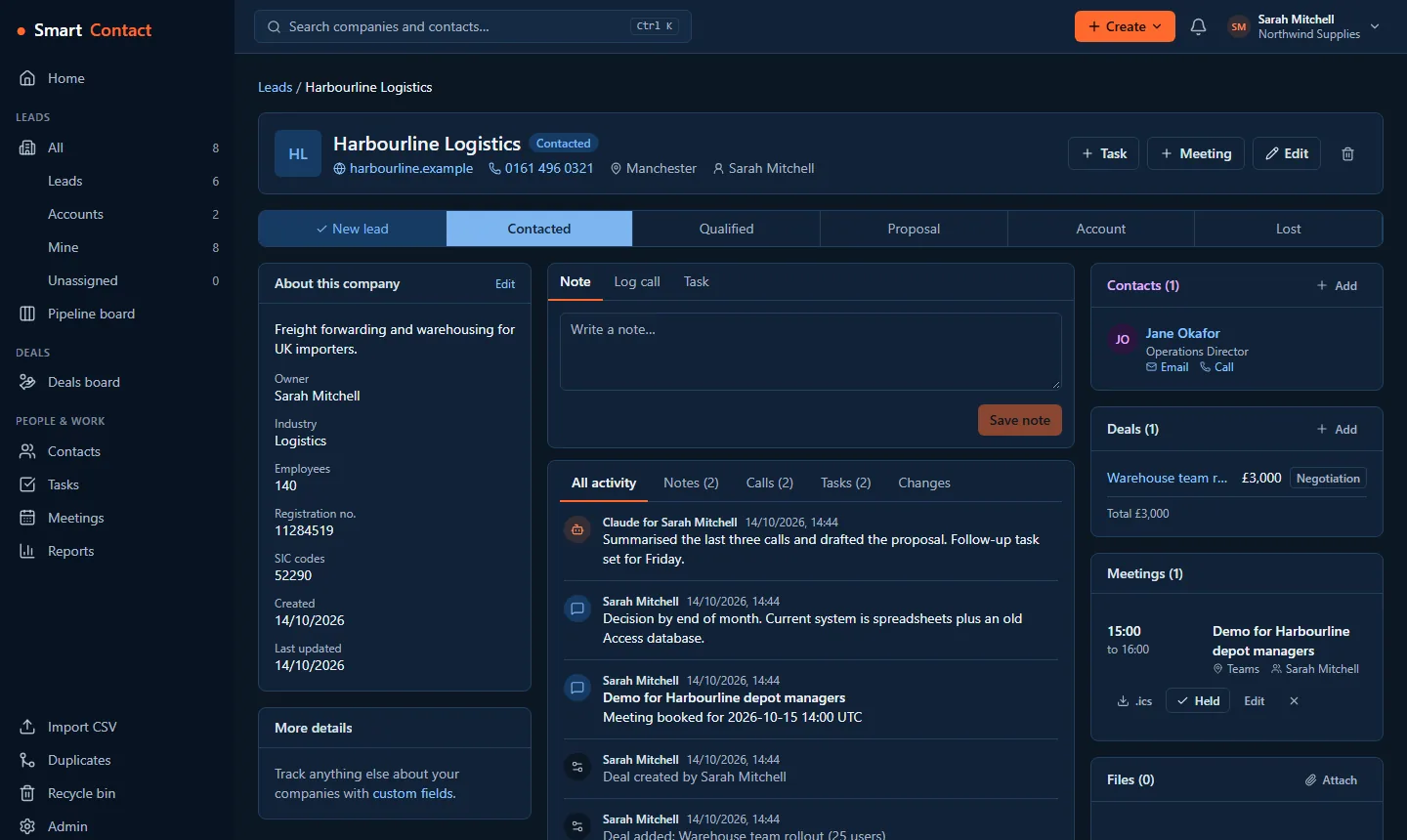
Blue for companies, purple for people, the way First Contact users remember it. Every call, note, email, meeting and file sits on one timeline, and the org chart shows who reports to whom.
Free for up to 2 users
Companies, contacts, calls, tasks and pipeline in one fast, uncluttered app. Connect Claude, Gemini or Copilot and let your agent update the CRM for you, with the same permissions as you.
Free forever for up to 2 users, and your first workspace gets Standard free for 30 days. No card needed.
SmartContact is the successor to First Contact CRM, rebuilt from scratch for today: fast, mobile-friendly and open.
Blue for companies, purple for people, the way First Contact users remember it. Every call, note, email, meeting and file sits on one timeline, and the org chart shows who reports to whom.
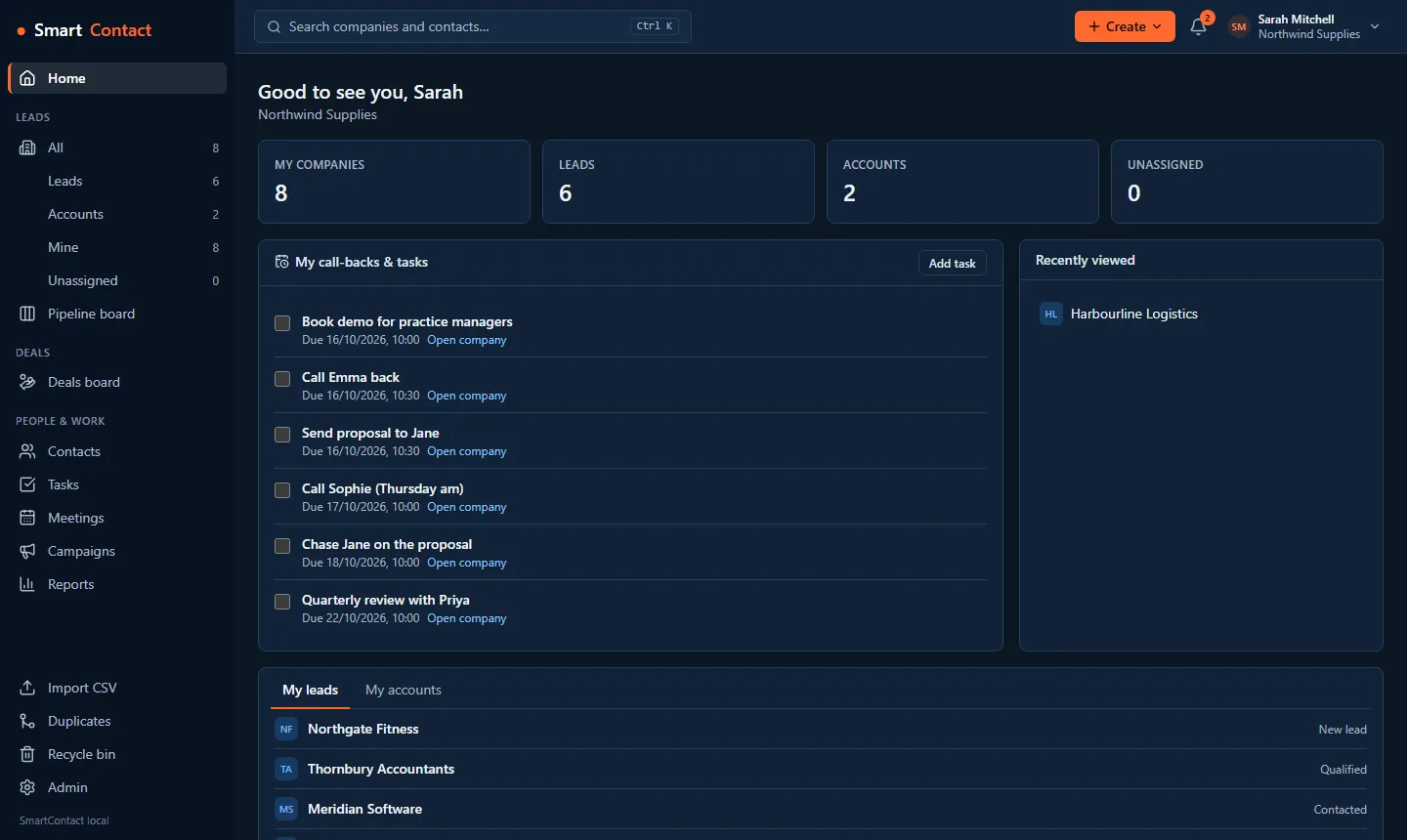
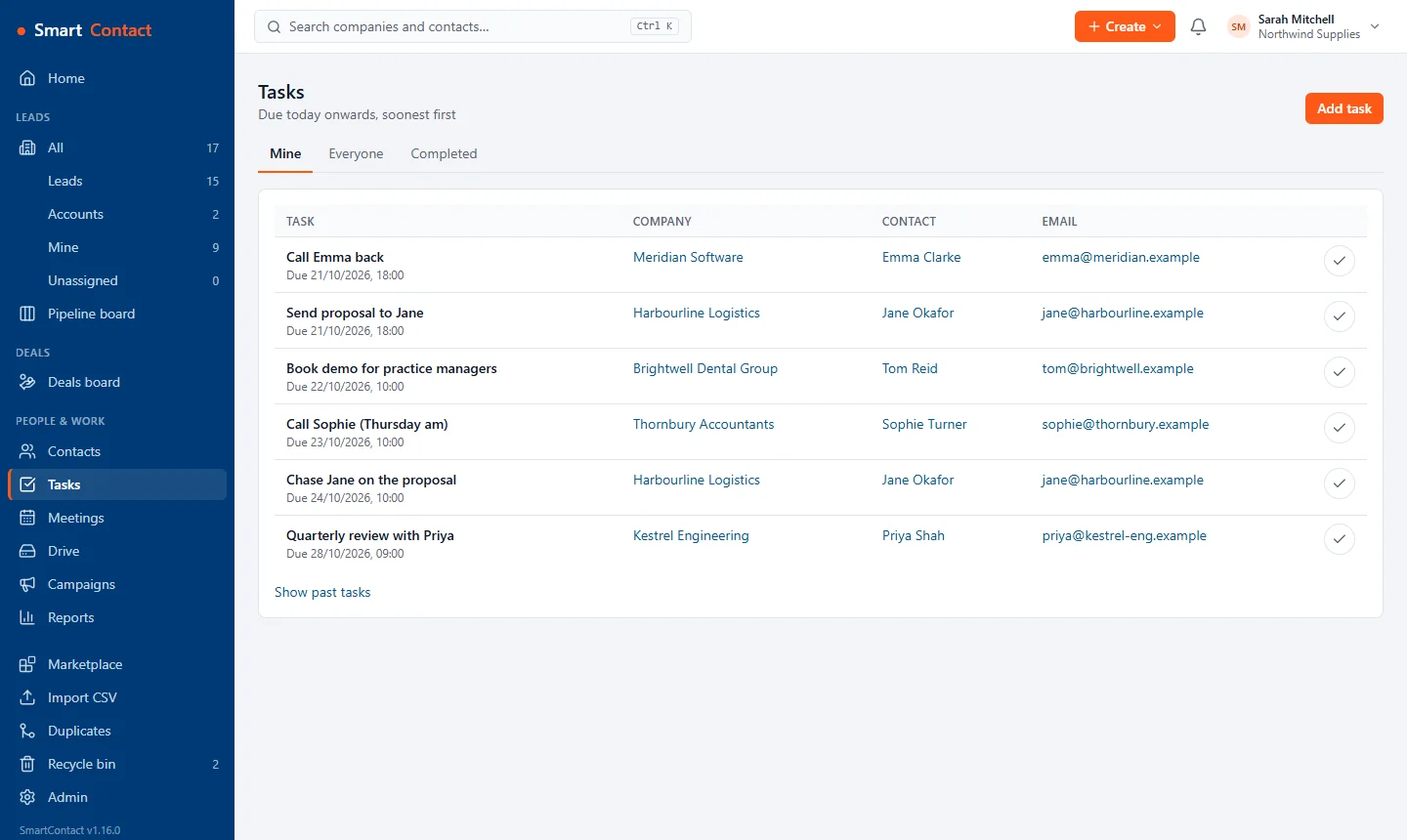
Log a call in two clicks and set the follow-up. Reminders pop up on screen, in the bell and by email, so nothing slips. Type @ to bring a teammate in.
Install the free Teams Phone or 3CX plugin and every call lands on the right contact's timeline by itself. With 3CX, incoming calls also show who is calling, straight from your CRM.
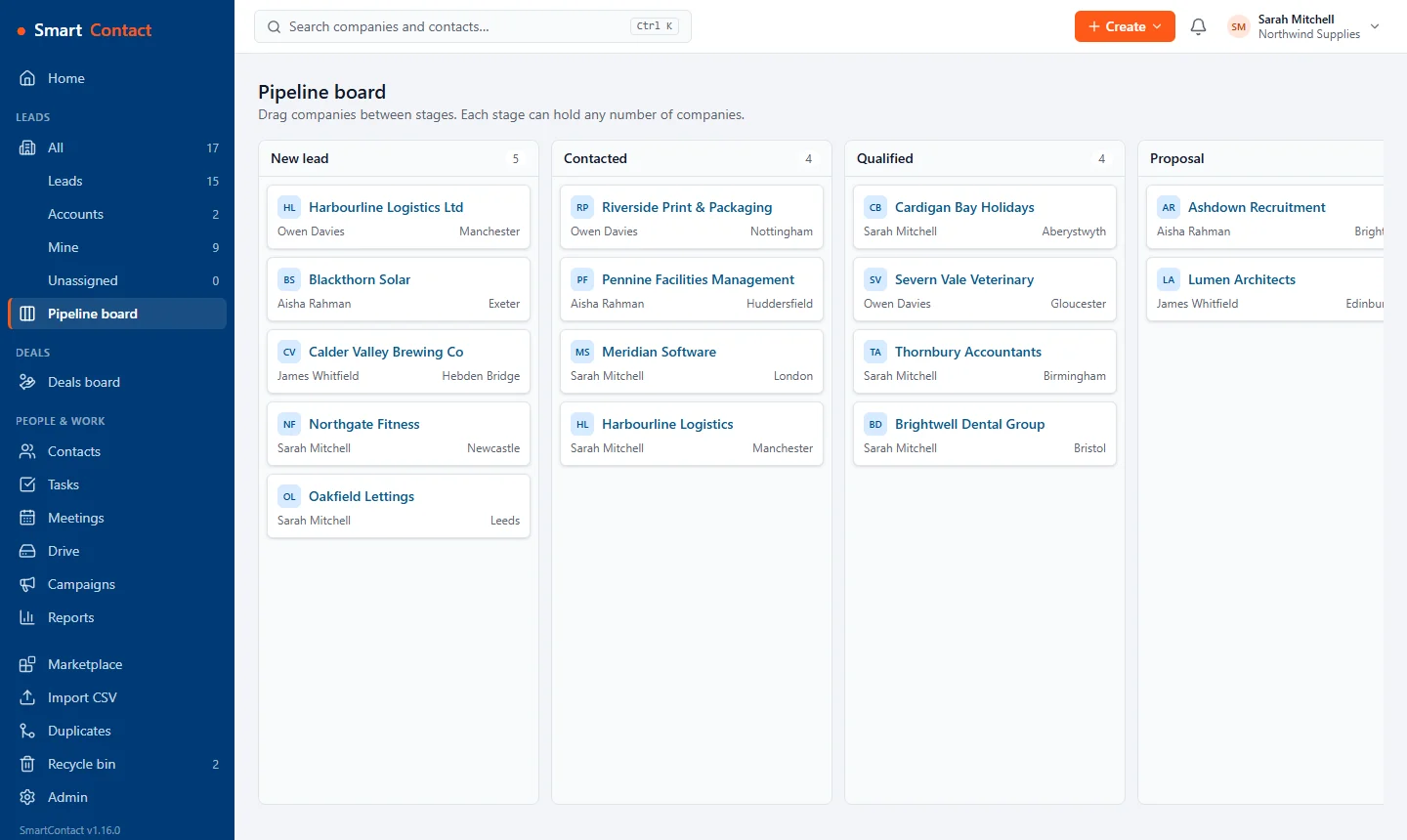
Drag leads through your own stages on a simple board. Run separate pipelines for different products or teams, and save the views you use every day.
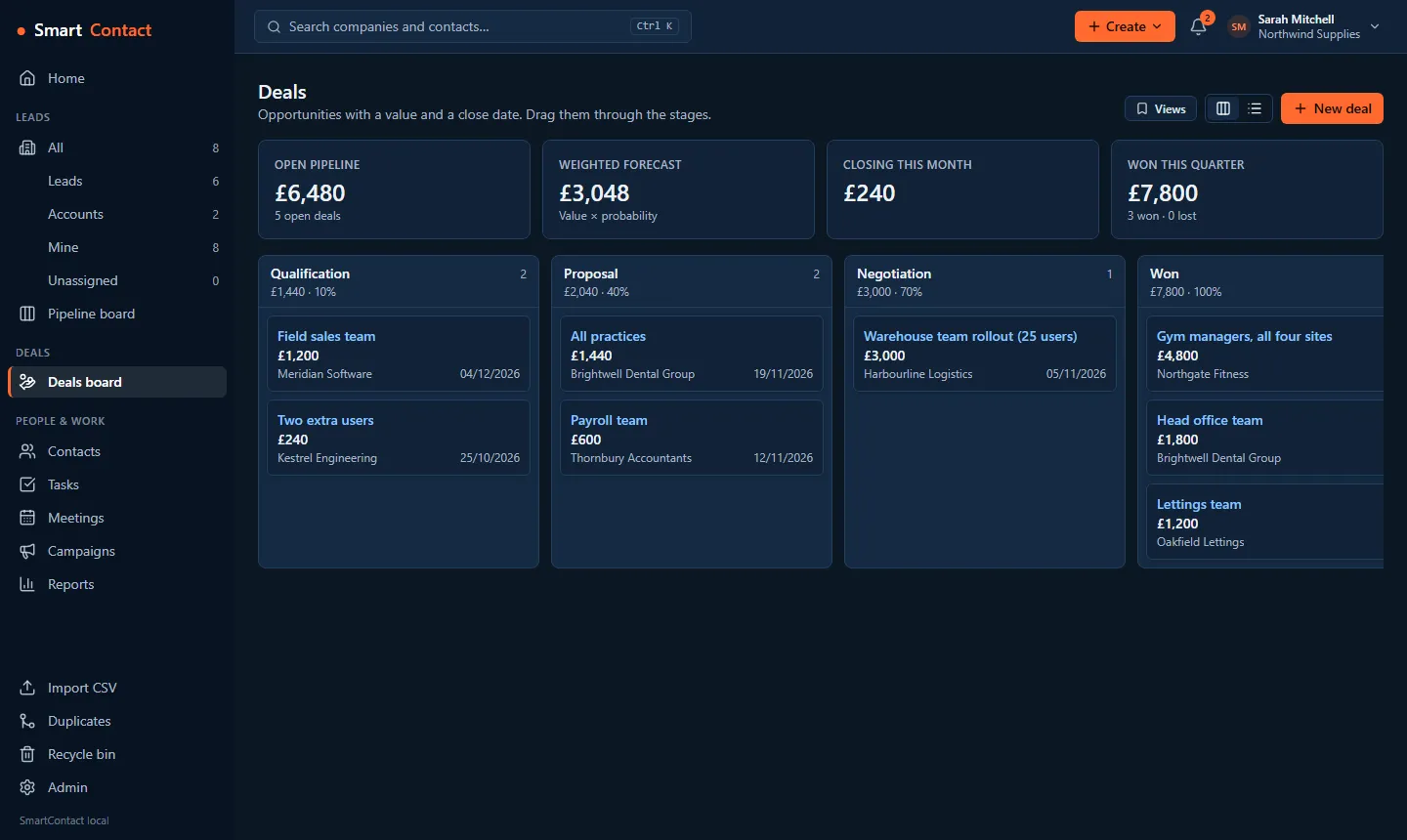
Track opportunities with a value, a close date and a win probability. See open pipeline, weighted forecast and what closes this month at a glance.
Book meetings on any company or deal, invite colleagues and contacts, and send calendar invites. On Standard, connect Outlook or Google Calendar and the meetings you book go straight into it, with a Teams or Google Meet link if you want one.
On Standard, connect your Microsoft 365 or Outlook mailbox. Emails with your contacts appear on their timelines by themselves, and you can write and reply from the CRM, sent from your own address.
Save email templates with merge fields on every plan. On Standard, put people on a sequence of follow-up emails and tasks, sent from your Outlook mailbox. It stops when they reply or unsubscribe, and checks their marketing consent before every email.
On Standard, build a quote on a deal from your price list, with VAT and discounts. Your customer views it, downloads the PDF and accepts online, the deal is marked won, and with Xero connected the accepted quote becomes a draft invoice.
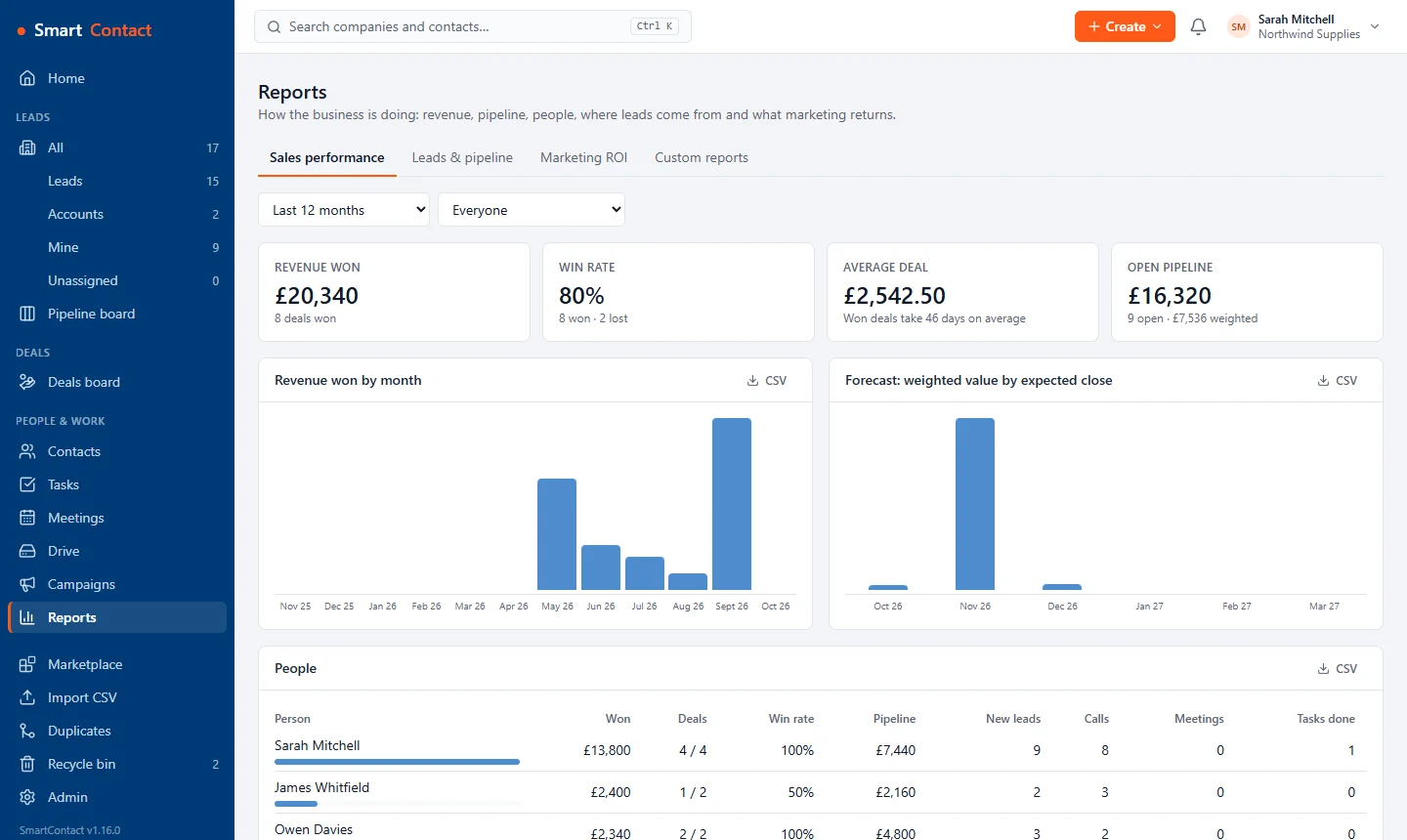
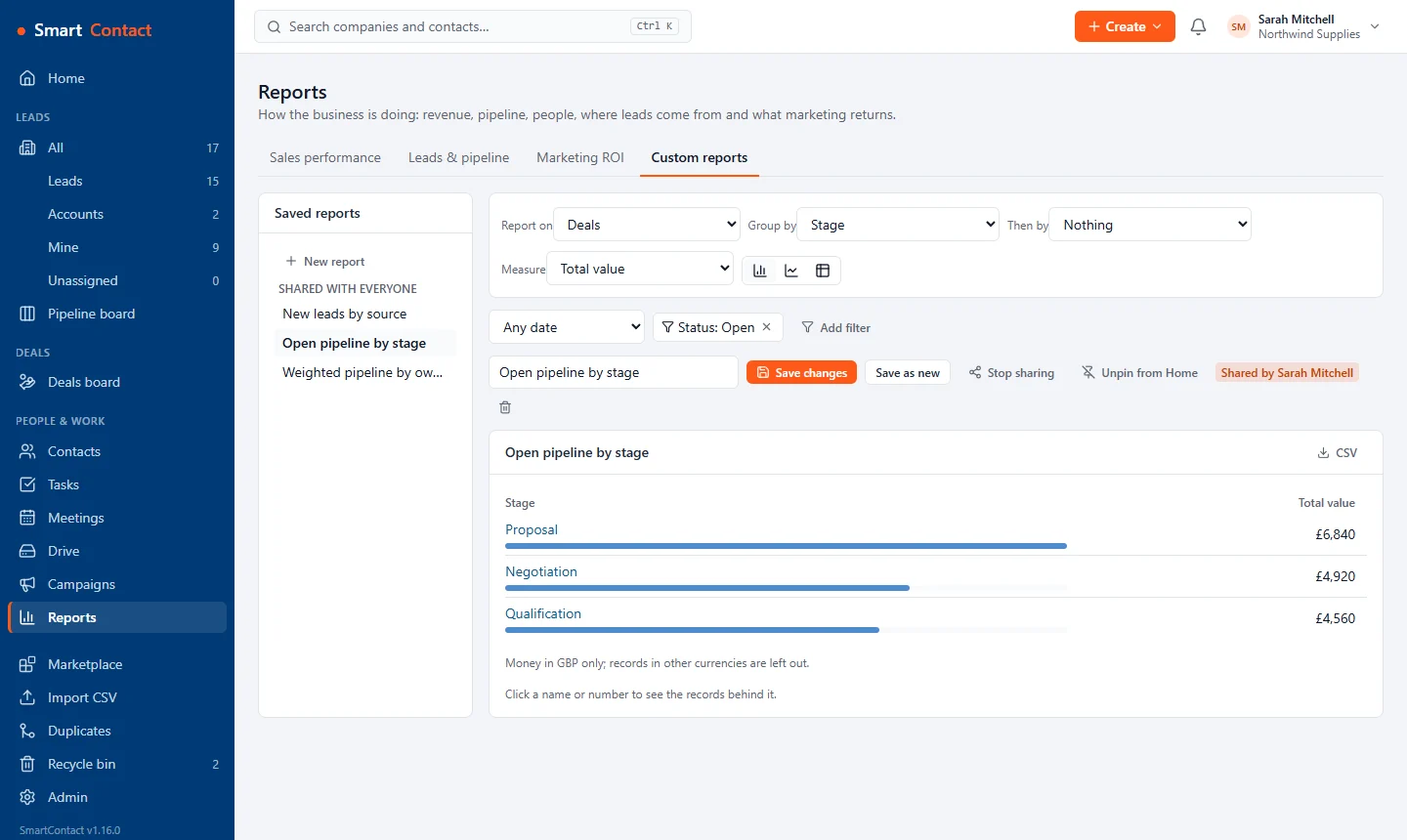
Sales performance by person, revenue by month, forecast by close date, lead sources and your deal funnel. On Standard, build your own reports: group, filter and chart anything, click through to the records, and pin favourites to your home page.
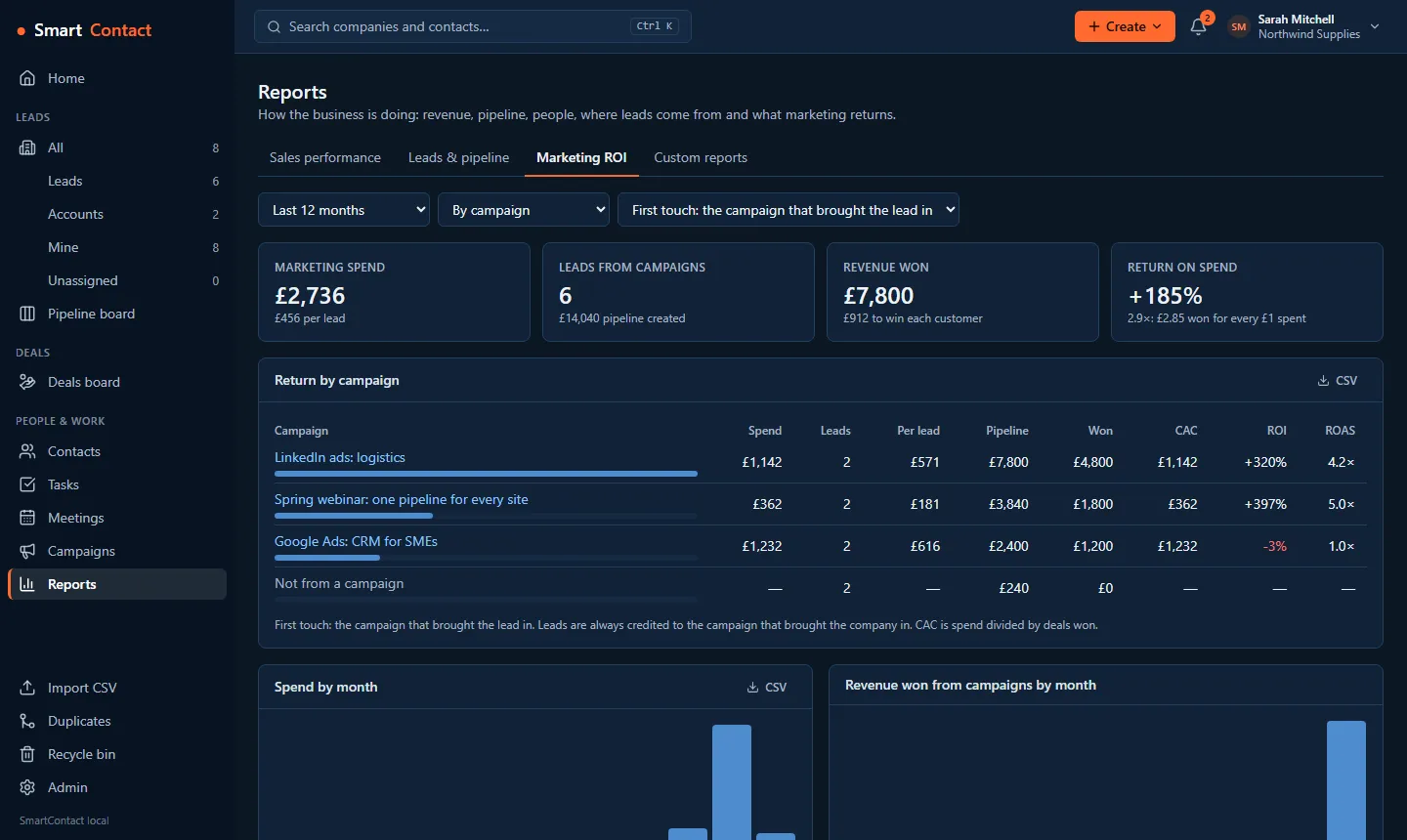
On Standard, track every campaign's spend, the leads and deals it brings in, and its ROI, with first-touch, last-touch or shared attribution. Web form leads are credited to the right campaign from the page's link.
Web-to-lead forms for your website: each enquiry lands as a new lead with the person attached. BCC or forward your emails to log them on the right contact. Leads from social, WhatsApp and SMS are coming soon on Standard.
Set simple rules: when a lead arrives or a deal changes, create the follow-up task, assign the owner, notify the team or fill in a field. Five active rules on Basic, unlimited on Standard.
Find a company on Companies House and the name, number, registered address and SIC codes fill themselves in. Record each person's marketing consent the way PECR expects, and export only the people you may contact.
Add custom fields to companies, contacts and deals. Move in from Pipedrive, HubSpot, Capsule, Zoho or Freshsales with your API key, or import a CSV. Find and merge duplicates, attach files to records, and export everything whenever you like.
UK-hosted, with GDPR tools built in: export or erase a person's data in one click. Roles decide who can see and change what, admins can require two-step sign-in for everyone, and the audit log records every change, by people and by AI agents. The database is backed up every day, with a copy kept in a second region.
Every feature is in the public REST API, documented with OpenAPI. Connect thousands of apps through Zapier (beta, every plan), install reviewed plugins in one click, or build your own.
Light and dark modes, high-contrast and colour-blind-safe themes, larger text and reduced motion, all in your own settings. Works on phone, tablet and desktop, and installs on your home screen like an app, with reminder notifications.
Built for your trade: IT support companies and MSPs · Accountants and bookkeepers · Marketing, design and digital agencies · Consultants and professional services firms · Architects and design practices · Builders and building contractors · Electrical contractors and electricians · Plumbing and heating engineers · Commercial cleaning companies · Wholesalers and distributors · Manufacturers and engineering firms
SmartContact runs a remote MCP server, so the assistant you already use can work in your CRM. Ask it to log a call, find everyone you haven't spoken to in 30 days, or prepare tomorrow's follow-ups.
https://app.smartcontact.online/mcp

> "Log a call with Jane at Acme:
   interested, chase on Friday."

✓ Call logged on Acme Ltd
✓ Task "Chase Jane" due FriReal screens from SmartContact, with made-up data.
£0 forever
£10 per user / month
Example: a team of 5 shares 20 GB of company storage (10 GB, increased by 2 GB for each of the 5 users), and each person also has their own 20 GB My drive.
Custom pricing
For larger organisations that outgrow Standard.
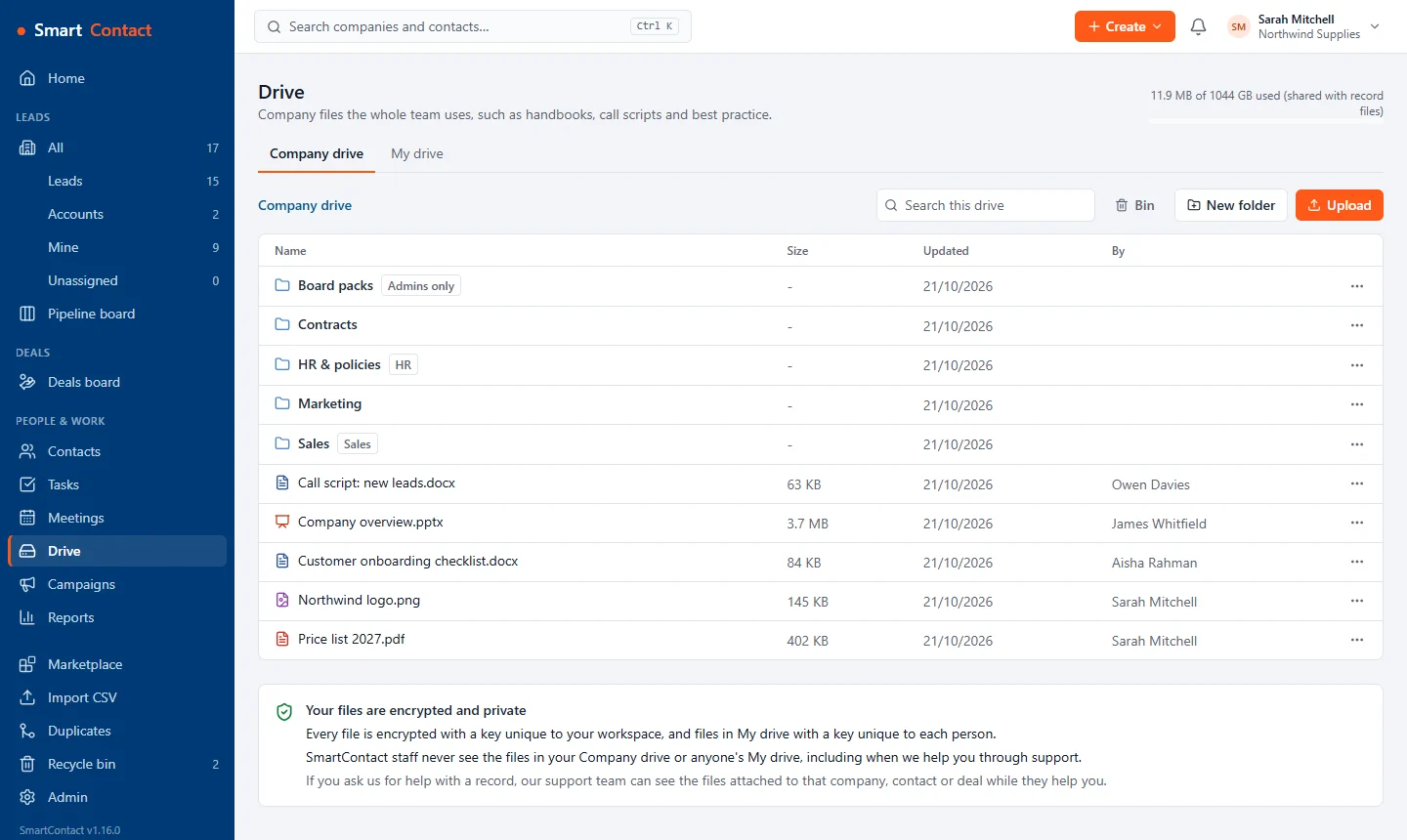
Every file is encrypted with a key unique to your workspace, and files in My drive with a key unique to each person. SmartContact staff never see the files in your Company drive or anyone's My drive, including when we help you through support.
If you ask us for help with a record, our support team can see the files attached to that company, contact or deal while they help you.
Prices exclude VAT, which is added at 20% for UK customers (VAT number GB 487 7549 21). *When WhatsApp launches, you connect your own WhatsApp Business number and Meta bills its message charges to you directly. Hit a Basic plan limit and your data stays yours: you can still view and export everything.
Know a business that would like SmartContact? Refer them from Settings › Refer a business and get 20% of what they pay, as credit on your bill, for their first 12 months. Referral terms.
Every feature is in the public REST API, with an OpenAPI description. Join the developer programme for a sandbox workspace and API keys, publish plugins to the SmartContact marketplace, set your own price and keep 90% of what customers pay.
SmartContact is a simple CRM for small sales teams: companies, contacts, calls, tasks, pipeline, deals and reports in one fast web app. It is the successor to First Contact CRM, and AI agents such as Claude, Gemini and Copilot can work in it through MCP.
The Basic plan is free for up to 2 users and 500 companies. Standard is £10 per user per month, or £100 per user per year, with unlimited users and companies. Your first workspace gets Standard free for 30 days, with no card needed. Prices exclude VAT.
Yes. SmartContact runs a remote MCP server at https://app.smartcontact.online/mcp. Add it to Claude or any MCP client and sign in, or give your agent its own API key, read only or read & write. It works with your permissions, can never delete records, and every change it makes is in the audit log.
Yes. The SmartContact Zapier app is in beta on every plan, including the free Basic plan: instant triggers for companies, contacts, deals and tasks, and actions to create records and add notes. Join the beta from smartcontact.online/zapier.
Your CRM data is hosted in London, UK. Files you attach to records are stored in the EU. SmartContact is run by OHF Consulting Ltd, a company registered in England and Wales.
Yes, on every plan. Bring companies, contacts and deals straight across from Pipedrive, HubSpot, Capsule, Zoho or Freshsales with your API key from that CRM (used for the import only, never stored), with owners and deal stages matched and a dry run first. Or import a CSV file from a spreadsheet, then use the duplicate finder to merge any repeats.
Unlimited users and companies, two-way Outlook email, Outlook and Google Calendar sync with Teams and Google Meet links, follow-up email sequences, quotes with online accept and Xero draft invoices, the Company drive and a private My drive for each person, more file storage, unlimited automations, marketing campaigns with ROI and attribution, the report builder and paid plugins. Leads from social, WhatsApp and SMS are coming soon on Standard.
On Standard, connect your Microsoft 365 or Outlook mailbox: emails with your contacts appear on their timelines, and you can send and reply from the CRM. Outlook and Google Calendar sync puts the meetings you book into your calendar, with a Teams or Google Meet link. On every plan, including Gmail, you can log any email by BCC or forwarding it to your workspace's address.
Yes. Free plugins for Microsoft Teams Phone and 3CX log every call on the right contact's timeline automatically, on every plan. 3CX also shows who is calling from your CRM. Install them from the Marketplace inside SmartContact.
Admins can require two-step sign-in for everyone in the workspace, with a passkey, single sign-on or an authenticator app, and see a history of sign-ins. Every file is encrypted, the audit log records every change, and the database is backed up every day with a copy kept in a second region.
Yes. Workspace admins find their referral link in Settings › Refer a business. For 12 months from a referred business's first payment, you get 20% of what it pays (excluding VAT) as credit on your SmartContact bill. See the referral terms at smartcontact.online/terms/referral.
Yes. Enterprise is Standard plus what bigger teams need: a higher daily API allowance for busy integrations and AI agents, extra company storage sized to you, help moving your data from your old CRM and priority support by email. Pricing depends on what you need, so get in touch through the contact form or at operations@smartcontact.online.
Basic includes 1 GB for files attached to companies, contacts and deals, shared by the workspace, with no Company drive or My drive. Standard has two kinds of storage. Shared company storage starts at 10 GB and increases by 2 GB for each user, and holds files on records and in the Company drive. On top of that, every user gets a private 20 GB My drive that only they can see. You can add +100 GB of company storage for £5 a month or +1 TB for £20 a month. Every file is encrypted.
Yes, at any time and on every plan: export any list to CSV, or download a full export of your workspace.
Your first workspace gets Standard free for 30 days, then stays on Basic (free for up to 2 users and 500 companies) unless you choose to pay. No card needed.
Create your free accountWant a demo, or have a question? Send us a message and we'll get back to you.
Your privacy choices
Optional cookies only if you allow them: Analytics (Google Analytics) and Marketing (Google Ads, Microsoft Advertising). Cookie policy We use only what's strictly necessary to run this site, unless you allow more. Analytics lets us measure visits and sign-ups with Google Analytics (cookies). Marketing lets Google Ads and Microsoft Advertising tell us which adverts work (cookies). Cloudflare Web Analytics counts visits without cookies and is always on. You can change your mind at any time. Cookie policy